Autopilot · for Shopify stores
Drop a photo.
Wake up to a listing.
Take a picture of a new product and drop it in a Google Drive folder. Overnight, Autopilot writes the whole Shopify listing in your store's voice: title, description, tags and collection. In the morning, you review it and publish.
Prosper, TX · North Texas and beyond
100
Listings drafted
On two live Shopify stores so far
1 photo
All you add
From your phone, into a shared folder
By morning
Drafts ready
With one email to review them
01 · How it works
Your part takes a minute. The rest happens overnight.
- 1
Any time
Take the photo
One product or a batch, one angle or several. A phone photo is fine.
- 2
Drop it in
Into your folder
We set up a Google Drive folder with you. Drag the photos in from your phone or computer.
- 3
Overnight
Autopilot writes it
It reads each photo and writes the title, description, tags and collection, using your store's own collections and voice.
- 4
Morning
You publish
Each product waits as a draft in Shopify, and one email links you to it. Nothing goes live until you say so.
02 · A real listing
One photo in. A finished draft out.
A real product from My School Spirit Shop in Prosper. This is what lands in the store, waiting for one look and a publish.
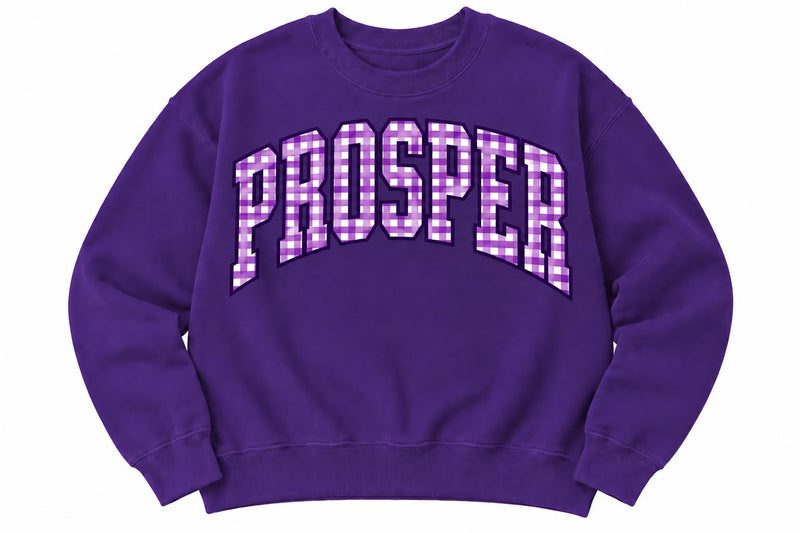
Windsong Prosper Gingham
Collection · Windsong Ranch Elementary
- Windsong Ranch
- Sweatshirt
- New arrival
- Spirit Wear
Gingham PROSPER across the chest on a soft crewneck. Made for chilly Friday nights: school pickup, the game, and everywhere in between.
03 · What you get
Listings that sound like your store wrote them.
Written in your store's voice
Set up once from your tone, price range and the kinds of products you sell.
Your collections, not guesses
It chooses from the collections your store already has.
Tags and search text
Tags for your filters, plus the page title and description Google shows.
Drafts, never surprises
Every product waits as a draft until you publish it.
One email per run
A short list of the new drafts, with a link straight to each one.
Your theme untouched
It fills in product details and leaves your storefront alone.
04 · Pricing
One price. Setup included.
- Setup included: your store profile, folder and email
- Title, description, tags, collection and search text
- Nightly runs, with one email when drafts are ready
- Drafts only, so you approve every product
- Need more than 100 a month? Book a call and we'll size it
Shopify itself is billed to you by Shopify. Texas sales tax applies where required.
05 · Questions
What store owners ask first.
What kind of photos work?
Any normal product photo: flat lays, hangers, on a model or in use. JPG or PNG. Good light makes a better listing, but phone photos work fine.
How does it learn my store's style?
During setup we write a short profile of your store: your tone, typical prices, the kinds of products you sell, and the collections to choose from. Every listing follows it.
Can I change a draft before it goes live?
Yes. Every product is created as a draft. Edit anything you like, then publish when you're ready. Nothing goes live on its own.
What if it can't tell the price?
It leaves the price at $0 and flags it in the email, so you set it before publishing. You can also add a short note with the photo to give the price or name yourself.
Does it change my theme?
No. It only fills in product details: title, description, tags, collection and price. Your theme and storefront stay exactly as they are.
What if I add more than 100 products a month?
Book a call and we'll set up a plan that fits. 100 a month covers most boutiques and specialty shops.
See it run on a real store.
Book a free 30-minute call. I'll show you Autopilot drafting listings on a live Shopify store, and you can ask anything.
No pitch deck. A conversation, then a written plan.